Can Humanities Students Use AI to Develop Web Games?
This article reveals a new development method called vibe coding, which requires no in-depth knowledge of programming frameworks. With just a foundation in HTML, CSS, and JavaScript, you can create complete products through dialogue with AI.
I only know how to code in HTML, CSS, and JavaScript. I have never used React, Vue, or Node, and I spent some time figuring out how to get a project running with npm.
However, recently, I created a functioning web game. It features an engaging story, integrates an AI model for real-time dialogue, includes visitor statistics, local storage, PWA installation, a custom subdomain, and has passed through a CDN with an SSL certificate.
All of this was achieved through conversations with AI. I never manually wrote a single line of business logic code.
This method is now referred to as vibe coding. A person with a bit of knowledge but not quite an engineer can create a website just by describing it verbally.
I turned this concept into a game called VibeCoding Simulator. In this game, you play as a humanities graduate who has failed three civil service exams and has only 4000 yuan in savings, trying out this new thing called vibe coding.
How I Got Here
A year ago, my self-assessment was simple: I was just someone who could write a static page in HTML.
My coding knowledge included:
- Understanding what a
<div>is and being able to write nested elements. - Having a rough understanding of CSS flex and grid.
- Writing a click event in JS, concatenating strings, and making a fetch call.
That was it. I was always in a state of having just heard of frameworks. Backend, databases, deployment, domain resolution, SSL certificates—I had never even opened the corresponding websites.

The opening narrative of this game is actually an expanded version of my own situation: a humanities graduate struggling to find a job, failing civil service exams, and watching others create small tools with AI. The only difference is that I know the three essential technologies.
But you know, there is a significant gap between knowing these three technologies and creating a product that can go live. There are countless questions in between: how to write a usable page state management, how to call an AI interface, how to implement storage, how to deploy online, how to make it accessible in a browser, and how to point a strange subdomain to it.
I didn’t truly learn any of these over the past year.
I asked AI.
What Does Vibe Coding Mean?
If you haven’t heard this term before reading this article, let me explain it simply:
It means you want to create something, and you describe to AI how you want it to function, what it should look like, and what should happen when you click it—AI will help you write the code.
Once it’s done, you click to run it. If it doesn’t work, you tell it, “No, this part isn’t responding,” and it will make adjustments.
Throughout the process, you don’t need to truly understand the code in between, nor do you need to review it line by line. Your job is not to “write code”; your job is to “describe what you want” and “judge whether AI’s output is correct.”
Yes, this doesn’t look like traditional “development”. In the programmer community, opinions on this matter are divided:
Some believe it’s a great liberation—one person can do what previously required a whole team.
Others see it as a disaster—what’s produced is a black box, lacking security and maintainability, and it will inevitably lead to problems.
I don’t intend to take sides here. I just want to say one thing:
Before vibe coding emerged, people like us, who only knew the three essentials and wanted to create something, didn’t even have the qualification to make mistakes.
We couldn’t reach the point of creating a complete product.

So What Did I Do?
Initially, I didn’t plan to create something so large.
I just wanted to make a small tool for AI to evaluate my product ideas. I’ve had too many thoughts like, “If only someone would create XX,” but each time it stopped there. I wanted to create something that would allow me to immediately know whether an idea was feasible whenever such thoughts arose.
Later, this small tool evolved into an independent mode called Idea Evaluation:
- Input the product name and idea description.
- AI will give you a “sharp review title” like “Master of Reinventing the Wheel,” “Pig 2.0 on the Hot Spot,” or “Warrior at the End of the Track.”
- A score from 0 to 10, along with reasons for the score.
- The most similar real product to this idea in history (product archaeology).
- Potential problems, core highlights, extendable features, and key points to focus on.
- Finally, there are six simulated sharp reviews from different perspectives: tech media, app store users, Zhihu bloggers, investors, independent developer communities, and competitor PMs.



However, I later felt that just having this one tool wasn’t enough. I wanted users to experience a bit of the essence of vibe coding while using it.
So, I added a complete entrepreneurial mode:
Entrepreneurial Mode: You Become the Humanities Graduate
When you open the website and click “Start Coding,” you will first see an opening narrative.
I wrote this opening quite seriously:
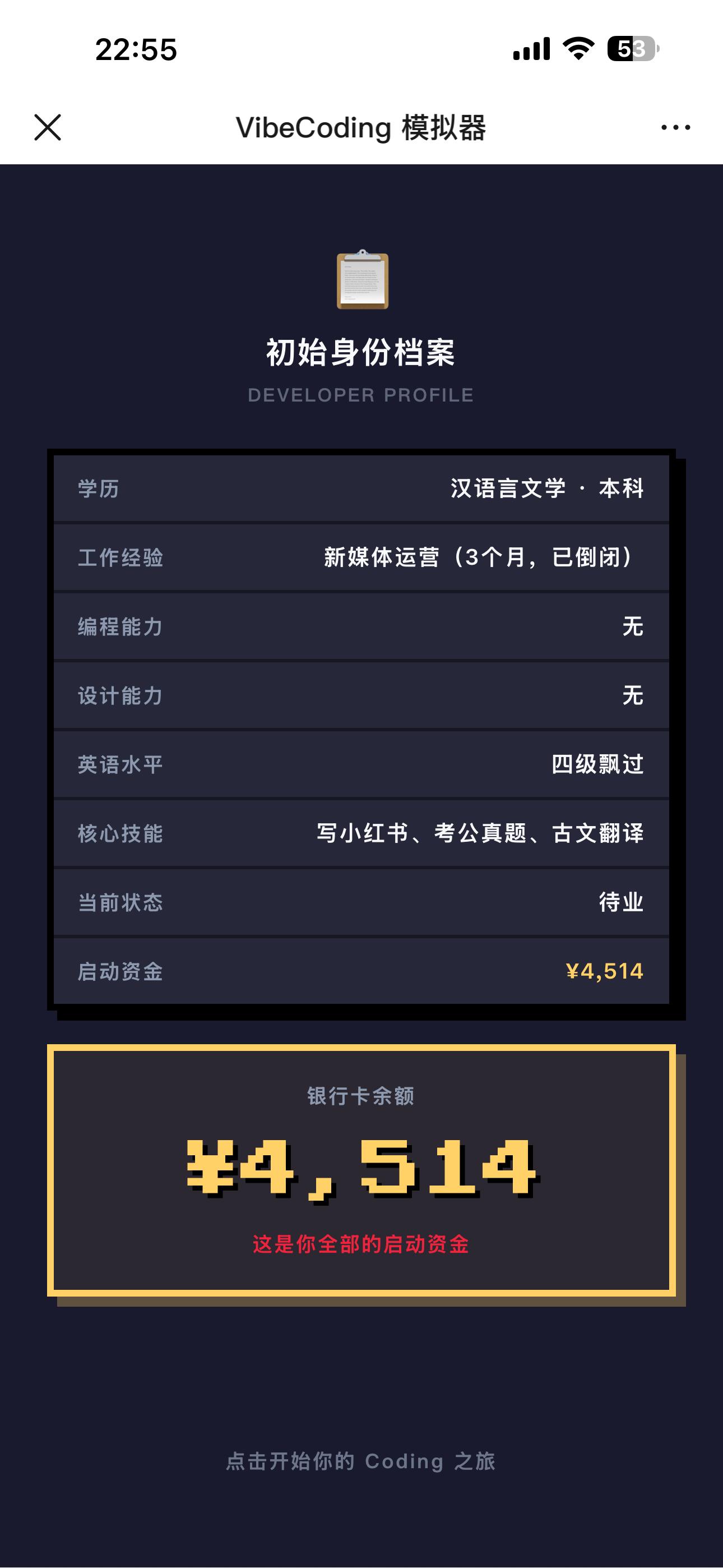
- You are a 211 graduate majoring in Chinese Language and Literature.
- You have failed the civil service exam three times, with the third interview being sabotaged by a connection.
- You’ve sent out over 300 resumes, and interviewers look at your major and say, “What can you do with this?”
- Later, you work in new media operations with a monthly salary of 4500, but the company goes bankrupt three months later.
- You move into a rental room costing 800 per month.
- Your family has stopped urging you.
Then one night, you stumble upon a post online:
“Humanities students used Vibe Coding to create a small program, earning 20,000 a month.”
You open your five-year-old laptop.
Once you enter the actual gameplay, the process is as follows:
- Select an AI model: Each model has different prices and capabilities.
- Choose a platform: web, mini-program, or app, each with different startup costs.
- Input your idea: product name and what you want to create.
- AI helps you plan.
- Enter the development phase: in each round, you will encounter an event requiring a decision—add a new feature? Fix a bug? Change the UI? These choices will affect the product’s functionality, experience, UI, and bug scores, as well as how much money you have left.
- If funds are insufficient, you will be forced to go live; if you have enough funds, you can complete development before going live.
- After going live, you will see the final score, the project type tags written by AI, and a “review.”
Every event in this process comes from my real experiences over the past year. The pitfalls I encountered, the decisions I hesitated over, and the moments I almost spent my last bit of money are all included.
You don’t need to actually quit your job or risk your 4000 yuan savings—you can walk through this in the game. It takes five to eight minutes.

My Personal Experience
At this point, I want to share a few less “promotional” thoughts.
The process of creating this website wasn’t as romantic as it’s often portrayed.
The image of “generating a website with one sentence” is real, but it usually only happens in the first hour. Once you get specific about what you want—like needing it to have storage, managing state between pages, ensuring it doesn’t deform on certain mobile devices, connecting to a specific AI interface, and truly deploying it to run—you will find your conversations with AI becoming very long, fragmented, and filled with many “no, that’s not right, try again.”
My feelings were:
- At 9 AM, I thought, “Wow, this thing works!”
- At noon, I thought, “Wait, this part seems a bit off.”
- At 3 PM, I thought, “Why have I had to change this section six times, and it’s still not right?”
- At 5 PM, I deleted the entire segment and rewrote the prompt.
- At 8 PM, I finally got it running and discovered there was a bug on the homepage.
But the essence of this matter is different from my previous inability to create anything.
In the past, I was stuck at “I can’t do this.”
Now, I’m at “I can do this, but which specific part needs to be adjusted three more times?”
From the outside, these two states may seem similar—they both involve “still tinkering.” But internally, they are entirely different. The former is dead; the latter is alive.
Vibe coding truly changes the threshold for the latter state. For decades, coding has had a barrier to entry. This barrier has objectively kept some people out. Now, this barrier has lowered, and those who were previously excluded can now enter.
Once inside, will they encounter problems? Yes. Will they make some low-level mistakes that have been laughed at in the industry for years? Yes.
But at least now they stand in a position where they can make those mistakes.
The Current State of This Game
This is currently a very rudimentary product.
- Running through the entrepreneurial mode takes about 5 to 8 minutes.
- Running through the idea evaluation takes about 1 to 2 minutes.
- The entire website is free, ad-free, and will not charge.
- Historical projects can be saved and viewed locally.
- It supports adding to the home screen for use like an app.
- I will gradually add more complex gameplay, such as team development like a game company, operations promotion, acquisitions, and exits, which are already in progress.
From my tests, the highest score I achieved was for a rather strange product—“AI helps office workers randomly generate leave excuses.” The system gave it the sharp review title “Soul Representative of Workers.” I laughed when I saw it.
Later, I input the idea of the VibeCoding Simulator itself into my tool. The score was decent, but one simulated sharp review from a “competitor PM” said: “Essentially still a test question.”
I didn’t change a single word after reading it; I just took it as it was.
A Few Pitfalls to Note
I don’t plan to write a tutorial. However, I want to casually mention a few pitfalls as a rant.
The first: There was an empty .gitkeep file in the dist directory, 0 bytes. When I deployed using CLI, it was encoded as a base64 upload, and the empty file encoded to an empty string. The backend validation rejected it with the message: “fileName and fileData are required.” I stared at the error message for half an hour, suspecting it was a token expiration, API failure, or network issue. Finally, while troubleshooting, I printed the file list and saw that .gitkeep. After deleting it, the deployment succeeded immediately.
The second: After configuring the custom domain resolution, I encountered a Cloudflare 525 error when opening it in the browser. The SSL handshake failed. I found that the CNAME record’s proxy was enabled, causing requests to go through Cloudflare before returning to Vercel, which hadn’t issued a certificate for this domain yet. I turned off the proxy, changed it to DNS only, waited for ten minutes, and the certificate was automatically issued, resolving the issue.
The third: After finishing the tracking SDK deployment, I checked the backend data the next day. In the event stream, I saw three events (page_view + session_start + session_end) when I refreshed, but the KPI area didn’t update. I suspected for two days that the data was underestimated. Finally, I discovered that the KPI in the panel code didn’t auto-refresh and only displayed the real-time event stream. After manually pressing the “refresh data” button, the KPI updated immediately. This kind of pitfall is the most frustrating—it’s not a bug; it’s just your misunderstanding.
If you’re also planning to create something, these issues might find you on a particularly tiring night.
Conclusion
This is a small endeavor.
I know a bit of HTML, CSS, and JS, have never learned frameworks, and have never touched the backend. However, during this time, I created a functioning web game using vibe coding. The game’s content revolves around vibe coding itself. It’s called VibeCoding Simulator.
There’s no profound intention behind writing this; it’s just a sharing of an event that happened.
If anyone wants to try it out, I’ll reply with the entry point in the comments or backend. This thing is completely free and ad-free, just something I created out of interest. I don’t plan to make it big or seek funding; I just want to see how many people will be interested.
If you also know a little code but are far from being able to launch a product independently, this is made for you.
— The Boss
Comments
Discussion is powered by Giscus (GitHub Discussions). Add
repo,repoID,category, andcategoryIDunder[params.comments.giscus]inhugo.tomlusing the values from the Giscus setup tool.